Introduction to Workflows
Workflows are the new way to control how data flows through your app. All data manipulation, filtering, sorting & running of models should now be performed via workflows.
The following use-cases should now be done via workflows:
- Running models: if you previously used the
Persistent Service Model Runnercomponent, or aButtonwith aHTTP RequestAction, this should now be replaced with aButtonthat triggers a Workflow - Filtering & sorting: if you previously used filtering & sorting functionality inside Adaptors for various components, this functionality should now be moved into a Workflow
- Data manipulation: if you previously used Actions (i.e.
Math Operation) or components (i.e.Data Duplicator) to perform any sort of data-manipulation , this should now be done with Workflows - String manipulation: if you previously used the
Languagestab to join strings together, this should now be done with Workflows
You will still be able to configure your app using the previous methods for the time being, but they will be deprecated in the future.
What is a Workflow?
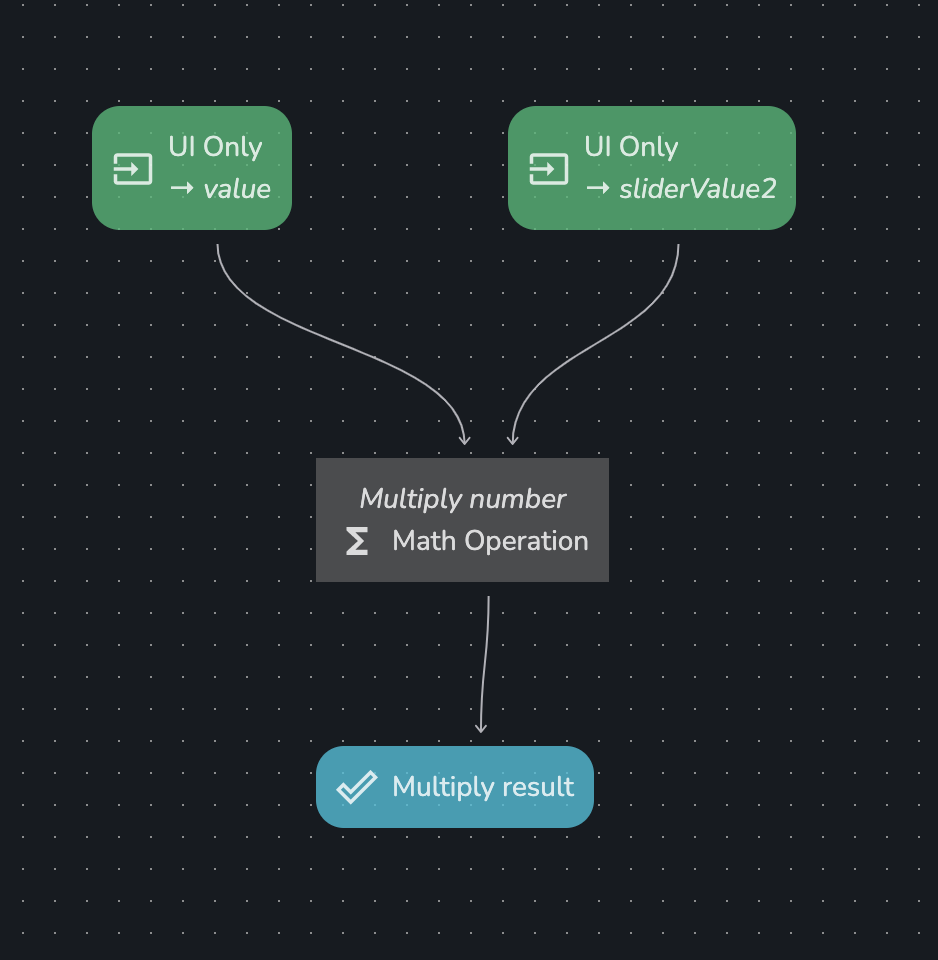
A workflow is a set of Steps that each have inputs & outputs which you link together to create your flow. There are 3 different types of steps:
Inputs: an input step is how data gets into a workflow. This how a workflow can retrieve data from UI elements (i.e. the selected value in a drop-down). These are coloured green.Operations: an operation step accepts various inputs, performs some operation, and creates some outputs. These are coloured grey.Outputs: an output step is how data gets out of a workflow. This is how UI elements consume data from a workflow. These are coloured blue.
This is what a workflow looks like:
Getting Started
The best way to learn how to use workflows is with a blank new app, and following these guides in order: